APUE 06 - 系统数据文件和信息
UNIX 系统的正常运作需要使用大量与系统有关的数据文件,如口令文件和组文件。
口令文件
UNIX 系统口令文件 (POSIX 称为用户数据库) 包含以下字段,这些字段被包含在 <pwd.h> 中定义的 passwd 结构中:
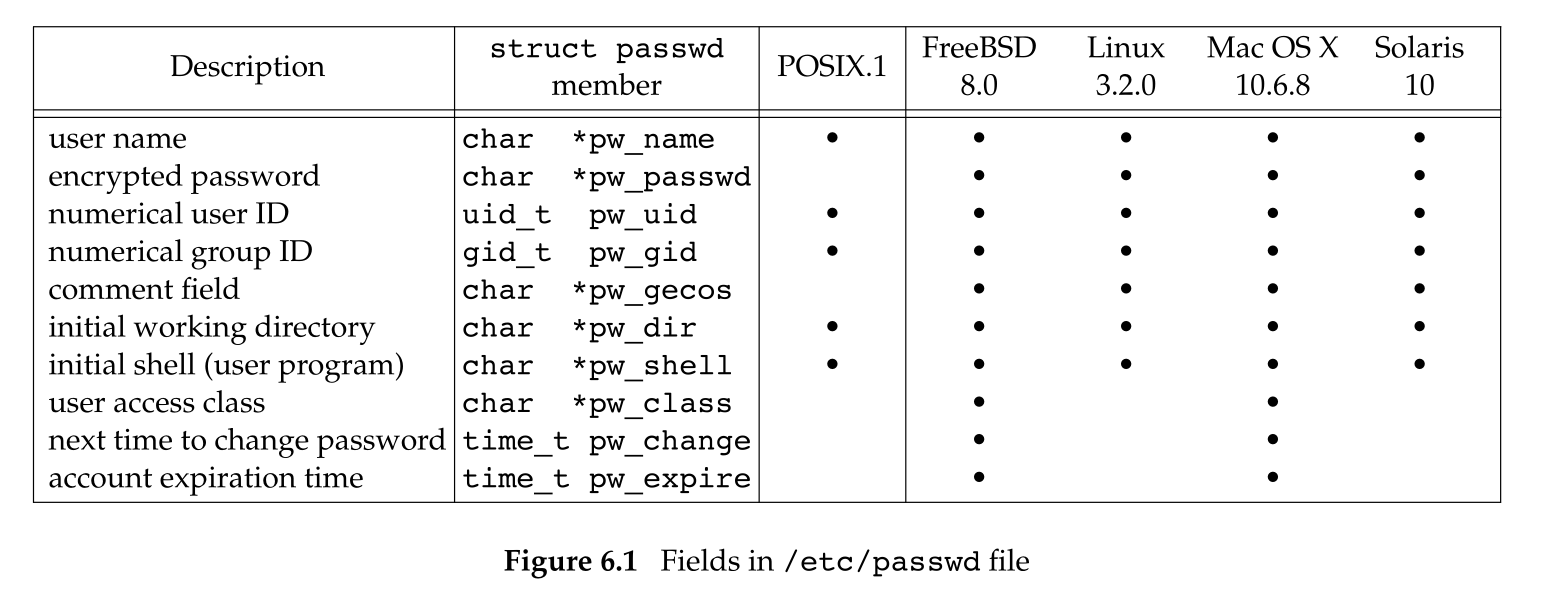
由于历史原因,口令文件是 /etc/passwd,而且是一个 ASCII 文件。每一行代表一个记录,每个记录包含以上字段,字段之间用冒号分隔,如在 Linux 中:
root:x:0:0:root:/root:/bin/bash
squid:x:23:23::/var/spool/squid:/dev/null
nobody:x:65534:65534:Nobody:/home:/bin/sh
sar:x:205:105:Stephen Rago:/home/sar:/bin/bash
关于这些登录项:
- 通常有一个用户名为 root 的登录项,其用户 ID 是 0。
- 加密口令字包含一个占位符 x,较早的 UNIX 系统中,该字段用于存放加密口令字。但为了安全,现在的系统将加密口令字放在另一个文件中。
- 口令文件项中的某些字段可能是空。如果加密口令字为空,这就意味着该用户没有任何口令 (不推荐这样做)。但是,注释字段为空白没有任何影响。
- shell 字段包含一个可执行文件名,它被用作该用户的登录 shell。如果该字段为空,则使用系统默认值。注意,用户 squid 的登录 shell 是一个设备 /dev/null 而不是可执行文件。这将阻止任何人以 squid 的名义登录到系统中。
- 想要阻止一个特定用户登录到系统,除了使用 /dev/null 之外,还可以将 /bin/false 和 /bin/true 用作登录 shell。前者简单的以非 0 状态终止,后者以 0 状态终止。
- 使用 nobody 作为登录名,任何人都可以登录到系统。但是其用户 ID 65534 和 组 ID 65534 没有任何特权,该用户只能访问人人皆可读,写的文件。
finger(1) 命令可以查看用户注释字段中的附加信息:
finger -p sarPOSIX 定义了两个获取口令文件项的函数,可以通过登录名或者用户 ID 查看相关项:
#include <pwd.h>

struct passwd *getpwuid(uid_t uid);
struct passwd *getpwnam(const char *name);

/* Both return: pointer if OK, NULL on error */
ls(1) 程序使用了 getpwuid 函数,它将 i-node 中的数字 ID 映射为用户的登录名。在键入登录名时,login(1) 程序会使用 getpwnam 函数。
这两个函数都返回一个指向 passwd 结构的指针。其指向的 passwd 结构通常是一个静态变量,只要调用任一相关函数,其内容就会被重写。
以上两个函数适用于已知 UID 或者 UNAME 的情况,下面三个函数用于未知情况下查询:
#include <pwd.h>

struct passwd *getpwent(void);
/* Returns: pointer if OK, NULL on error or end of file */

void setpwent(void);
void endpwent(void);
函数 getpwent 返回口令文件中的下一个记录项,每次调用它时都会重写共享的 passwd 结构 (第一次调用时,它会自动打开要使用的口令文件)。函数 setpwent 会使程序定位到口令文件的开始处。使用 getpwent 函数后,一定要调用 endpwent 函数关闭这些文件。
下面是 getpwnam 函数的一个实现:
#include <pwd.h>
#include <stddef.h>
#include <string.h>
struct passwd *getpwnam(const char *name)
{
    struct passwd *ptr;
    setpwent();
    while ((ptr = getpwent()) != NULL)
        if (strcmp(name, ptr->pw_name) == 0)
            break;
    /* found a match */
    endpwent();
    return (ptr);
    /* ptr is NULL if no match found */
}
阴影口令
加密口令是经过单向加密算法处理过的用户口令副本,因为算法是单向的,所以不能从加密口令猜测到原来的口令。对于一个加密口令,没有办法将其反变换到明文口令。
常见的破解明文口令的方法是穷举法,即根据加密口令不断实验。为了增加破解难度,某些系统将加密口令存放在另一个称为阴影口令 (shadow password) 的文件中,这将阻止一般用户获取原始资料。阴影口令文件至少要包含用户名和加密口令:
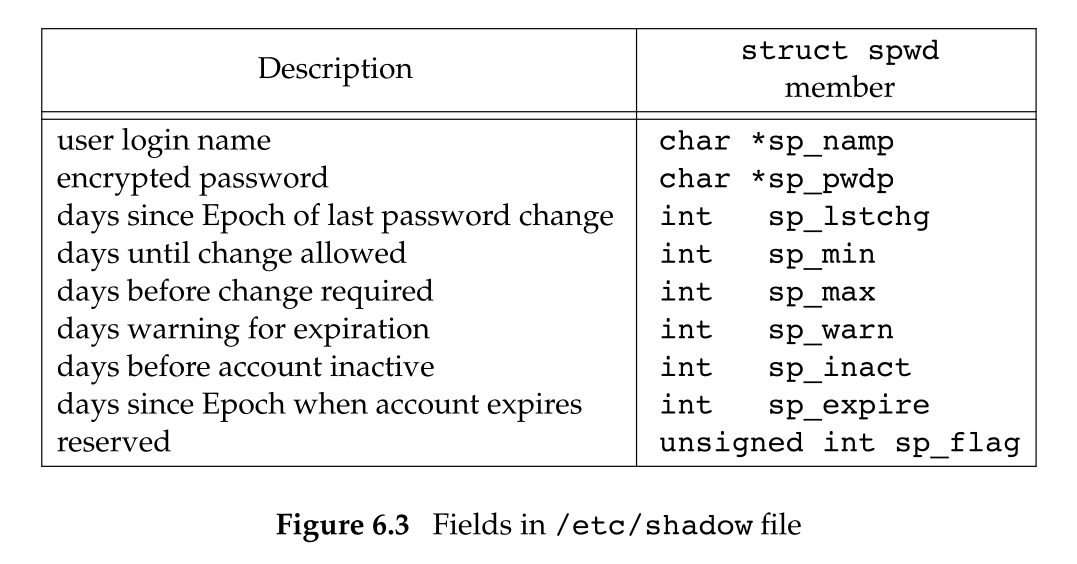
阴影口令不应是一般用户可以读取的,仅有少数几个程序需要访问加密口令:login(1) 和 passwd(1)。这些程序通常都是设置用户 ID 位为 root 的可执行文件。有了阴影口令文件,普通口令文件 /etc/passwd 就可以被任何用户自由读取。
在 Linux 中,有一组用于访问阴影口令文件的函数:
#include <shadow.h>

struct spwd *getspnam(const char *name);
struct spwd *getspent(void);

/* Both return: pointer if OK, NULL on error */

void setspent(void);
void endspent(void);
组文件
UNIX 组文件 (POSIX 称为组数据库) 包含下列字段,这些字段被包含在 <grp.h> 中的 group 结构中:
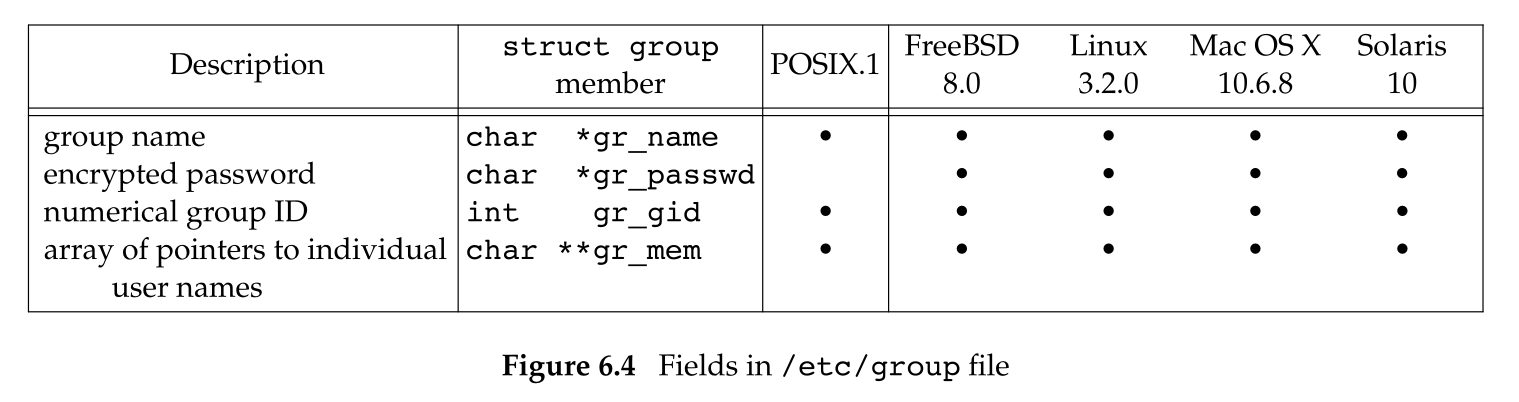
字段 gr_mem 是一个指针数组,其中每个指针指向一个该组中的用户名字符串,该数组以 NULL 指针结尾。
POSIX 定义了以下两个函数查看组名和组 ID:
#include <grp.h>

struct group *getgrgid(gid_t gid);
struct group *getgrnam(const char *name);

/* Both return: pointer if OK, NULL on error */
类似操作口令文件的函数,这两个函数也返回一个指向静态变量的 group 结构指针。并且,每次调用相关的函数都将重写该结构。
如果要搜索整个组文件,需要使用另外 3 个函数:
#include <grp.h>

struct group *getgrent(void);
/* Returns: pointer if OK, NULL on error or end of file */

void setgrent(void);
void endgrent(void);
这 3 个函数类似之前搜索口令文件的函数:setgrent 打开组文件 (如果它尚未被打开) 并反绕到开始处。getgrent 从组文件中获取下一条记录 (如果组文件未打开则先打开它)。engrent 关闭组文件。
附属组 ID
在早期的 UNIX 系统中,一个用户在任何时候都只属于一个组。当用户登录时,系统就取其口令文件项中记录的组 ID 作为它的实际组 ID。可以执行 newgrp(1) 更改组 ID,如果 newgrp 执行成功,则实际组 ID 就更改为新的组 ID,它将被用户后续的权限检查。执行不带任何参数的 newgrp 即可返回原来的组。
从 BSD 4.2 开始,附属组 ID 的概念被引入。现在用户不仅可以属于口令文件中对应的一个组,也可以属于多至 16 个另外的组。文件访问权限检查相应被修改为:不仅将进程的有效组 ID 与对应文件的组 ID 比较,而且也将所有附属组 ID 与文件的组 ID 相比较。
使用附属组 ID 的优点是不必再显式的来回更改组。以下 3 个函数用于获取和设置附属组 ID:
#include <unistd.h>
int getgroups(int gidsetsize, gid_t grouplist[]);
/* Returns: number of supplementary group IDs if OK, −1 on error */

#include <grp.h> /* on Linux */
#include <unistd.h> /* on FreeBSD, Mac OS X, and Solaris */
int setgroups(int ngroups, const gid_t grouplist[]);

#include <grp.h> /* on Linux and Solaris */
#include <unistd.h> /* on FreeBSD and Mac OS X */
int initgroups(const char *username, gid_t basegid);

/* Both return: 0 if OK, −1 on error */
getgroups 将进程所属用户的各个附属组 ID 填写到数组 grouplist 中,并且需要传递填写的最大数量 gidsetsiz。实际填写的附属组 ID 数将作为返回值返回。
特殊的,如果 gidsetsize 为 0,则函数只返回附属组 ID 数。
setgroups 是特权函数,超级用户可以调用它来为调用进程设置附属组 ID 表。其中,grouplist 是组 ID 数组,而 ngroups 说明数组中的元素数。
通常,只有 initgroups 函数调用 setgroups,initgroups 读整个组文件,然后对 username 确定其组成员关系,最后它调用 setgroups 来为该用户初始化附属组 ID 表。其中,basegid 是 username 在口令文件中对应的组 ID,这个组 ID 也会被设置到附属组 ID 表中。
只有少数几个程序调用 initgroups 函数,入 login(1) 在用户登录时会调用它。
其他数据文件
除了口令文件和组文件外,UNIX 系统还使用很多其他文件。一般情况下,对每个数据文件至少有 3 个函数:
- get 函数
读下一个记录,如果需要,还会打开该文件。此函数通常返回一个指向某种结构的指针,当到达文件尾端时返回空指针。大多数 get 函数返回一个指向静态变量的指针,如果要保存它,则需要复制它。
- set 函数
打开相应文件 (如果尚未打开),然后反绕该文件。如果需要从文件的起始位置开始处理,则调用它。
- end 函数
关闭相应数据文件。
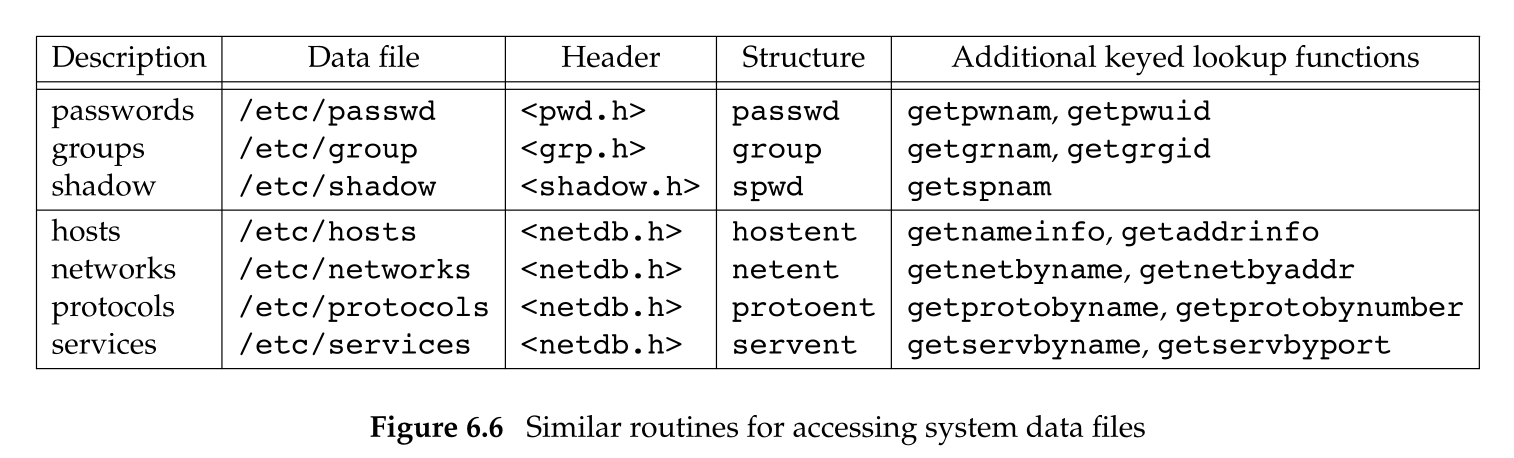
如果数据文件支持某种形式的键搜索,则也提供搜素具有指定键的函数。例如,针对口令文件,有两个按键搜索的函数:getpwnam 和 getpwuid。
下面是一些这样的例程:
登录账户记录
大多数 UNIX 系统都提供下列两个数据文件:utmp 文件记录当前登录到系统的各个用户。wtmp 文件跟踪各个登录和注销事件。在 V7 中,每次写入这两个文件中的是一个结构的二进制记录:
struct utmp {
    char ut_line[8]; /* tty line: "ttyh0", "ttyd0", "ttyp0", ... */
    char ut_name[8]; /* login name */
    long ut_time;
    /* seconds since Epoch */
};
登录时,login 程序填写此类型结构,然后将其写入到 utmp 文件中,同时也将其添写到 wtmp 文件中。注销时,init 进程将 utmp 文件中的相应记录擦除 (用 NULL 填充每个字段),并将一个新的记录添写到 wtmp 文件中。在 wtmp 文件的注销记录中,ut_name 字段清除为 0。在系统再启动时,以及更改系统事件和日期的前后,都在 wtmp 文件中追加写特殊的记录项。
who(1) 程序读取 utmp 文件,并以可读格式打印其内容。后来的 UNIX 版本提供 last(1) 命令,它读 wtmp 文件并打印所选择的记录。
系统标识
POSIX 定义了 uname 函数,它返回与主机和操作系统有关的信息:
#include <sys/utsname.h>
int uname(struct utsname *name);

/* Returns: non-negative value if OK, −1 on error */
调用该函数需传递一个 utsname 结构的地址,该函数会填写此结构。POSIX 只定义了该结构中最少需提供的字段,每个字段的长度是由实现确定的:
struct utsname {
    char sysname[]; /* name of the operating system */
    char nodename[];/* name of this node */
    char release[]; /* current release of operating system */
    char version[]; /* current version of this release */
    char machine[]; /* name of hardware type */
};
每个字段都以 NULL 字符结尾,utsname 结构中的信息可用 uname(1) 命令打印。
历史上,BSD 派生的系统提供 gethostname 函数,它只返回主机名,该名字通常就是 TCP/IP 网络上主机的名字。现在,gethostname 已经在 POSIX 中定义。
#include <unistd.h>

int gethostname(char *name, int namelen);

/* Returns: 0 if OK, −1 on error */
参数 namelen 指定 name 缓冲区的长度,如果缓冲区空间足够大,则通过 name 返回的字符串是以 NULL 结尾的,否则无法确定返回的字符串是否以 NULL 结尾。
如果宿主机连接到 TCP/IP 网络中,则此主机名通常是该主机的完整域名。
hostname(1) 命令可用来获取和设置主机名,超级用户可以使用函数 sethostname 设置主机名。
时间和日期
UNIX 内核提供的基本时间服务是计算从协调世界时 (UTC) 这以特定时间以来所经过的秒数。这种秒数以数据类型 time_t 表示,它又被称为日历时间,日历时间包括时间和日期。
time 函数返回当前时间和日期:
#include <time.h>

time_t time(time_t *calptr);

/* Returns: value of time if OK, −1 on error */
时间值作为返回值返回,并且如果参数非空,则时间值也存放在 calptr 指向的单元内。
POSIX 的实时扩展增加了对多个系统时钟的支持。在 SUS v4 中,控制这些时钟的接口从可选组被移至基本组。时钟通过 clockid_t 类型进行标识,下面是标准值:
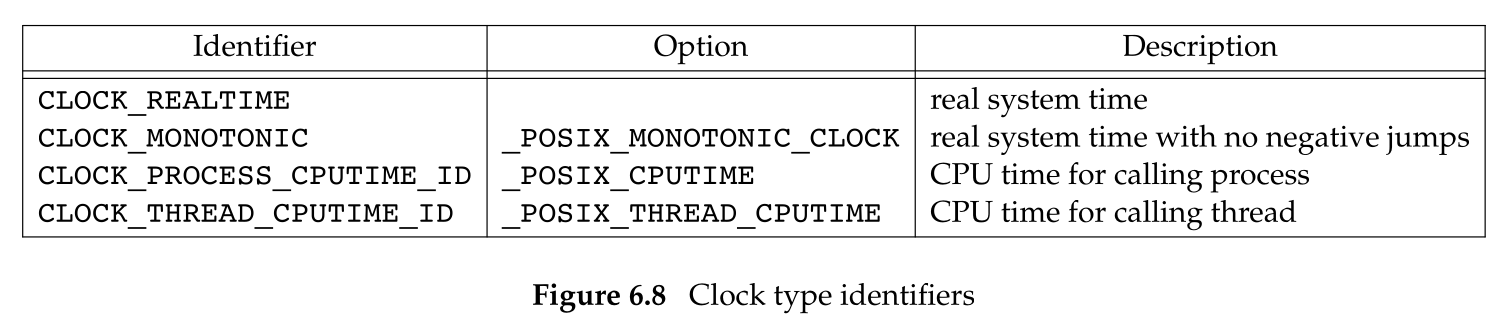
clock_gettime 函数用于获取指定时钟的时间,它将结果存放至 timespec 结构中,结果包含秒和纳秒:
#include <sys/time.h>

int clock_gettime(clockid_t clock_id, struct timespec *tsp);

/* Returns: 0 if OK, −1 on error */
当时钟 ID 为 CLOCK_REALTIME 时,clock_gettime 函数的行为与 time 类似,区别在于:如果系统支持高精度时间值,那么 clock_gettime 可以得到比 time 更高精度的时间值。
#include <sys/time.h>

int clock_getres(clockid_t clock_id, struct timespec *tsp);

/* Returns: 0 if OK, −1 on error */
clock_getres 函数把参数 tsp 指向的 timespec 结构初始化为与 clock_id 对应的时钟精度。例如:如果精度为 1 毫秒,则 tv_nsec 就是 1 000 000,tv_sec 就是 0。
要对特定的时钟设置时间,可以调用 clock_settime 函数:
#include <sys/time.h>

int clock_settime(clockid_t clock_id, const struct timespec *tsp);

/* Returns: 0 if OK, −1 on error */
改变时钟值需要适当的特权,但是有些时钟是不能修改的。
SUS v4 指定 gettimeofday 已经弃用,但是,与 time 函数相比,gettimeofday 提供了更高的精度 (达到微秒级):
#include <sys/time.h>

int gettimeofday(struct timeval *restrict tp, void *restrict tzp);

/* Returns: 0 always */
tzp 的唯一合法值是 NULL,其他值都将产生不确定的结果。
gettimeofday 函数将距离 UTC 以来的秒数存放在 tp 指向的 timeval 结构中,该结构将当前时间表示为秒和微秒。取得这种用整数表示的时间值后,通常要调用函数将其转换为分解的时间结构:localtime 和 gmtime 将日历时间转换为分解的时间,并将结果存放在 tm 结构中:
struct tm {       /* a broken-down time */
    int tm_sec;   /* seconds after the minute: [0 - 60] */
    int tm_min;   /* minutes after the hour: [0 - 59] */
    int tm_hour;  /* hours after midnight: [0 - 23] */
    int tm_mday;  /* day of the month: [1 - 31] */
    int tm_mon;   /* months since January: [0 - 11] */
    int tm_year;  /* years since 1900 */
    int tm_wday;  /* days since Sunday: [0 - 6] */
    int tm_yday;  /* days since January 1: [0 - 365] */
    int tm_isdst; /* daylight saving time flag: <0, 0, >0 */
};
各个时间函数之间的关系:
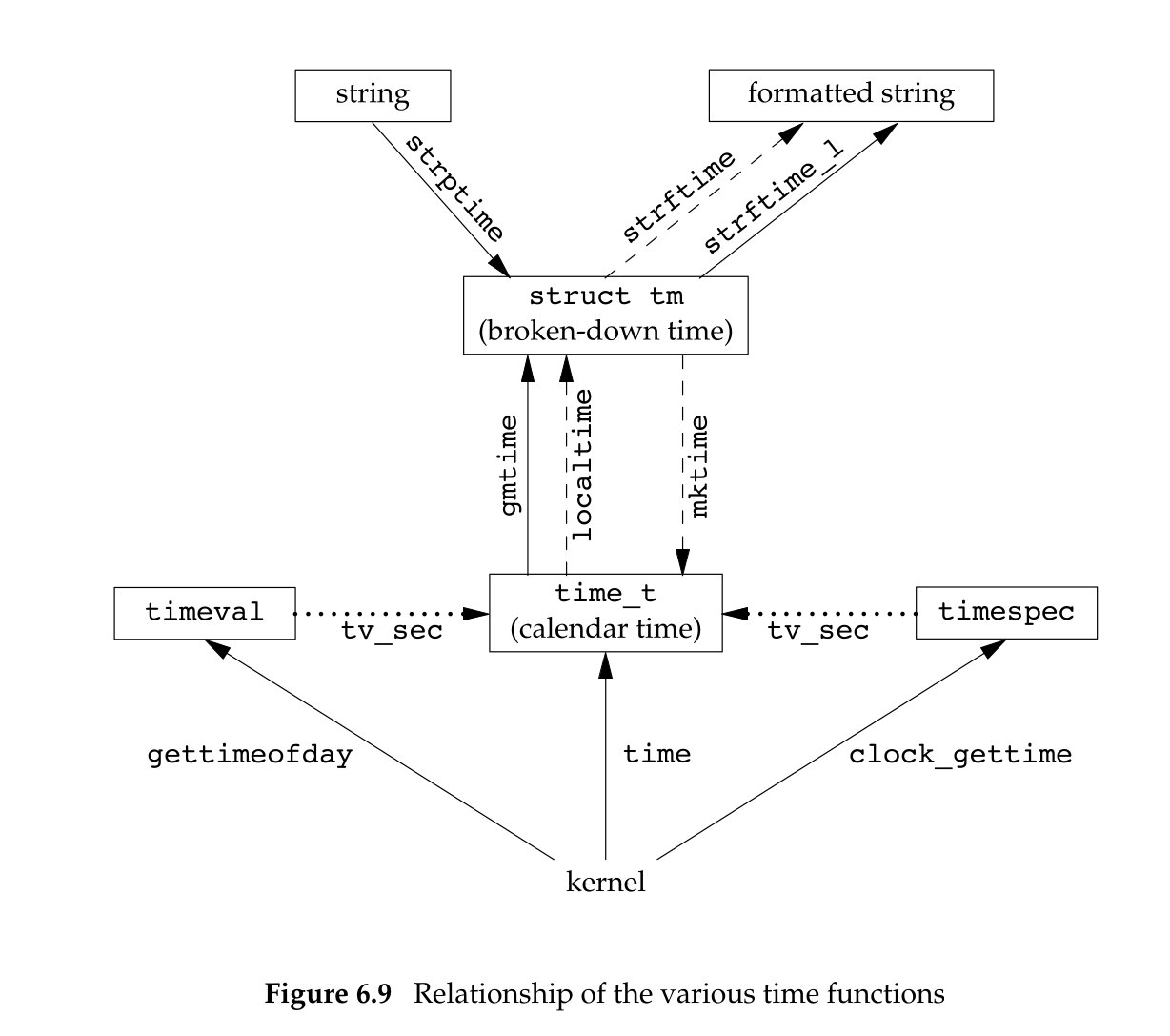
#include <time.h>

struct tm *gmtime(const time_t *calptr);
struct tm *localtime(const time_t *calptr);

/* Both return: pointer to broken-down time, NULL on error */
localtime 和 gmtime 之间的区别是:localtime 将日历时间准换成本地时间,而 gmtime 将日历时间转换为协调统一时间的年月日时分秒周日分解结构。
函数 mktime 以本地时间的年月日等作为参数,将其变换为 time_t 的值:
#include <time.h>

time_t mktime(struct tm *tmptr);

/* Returns: calendar time if OK, −1 on error */
函数 strftime 是一个类似 printf 的时间值函数,它非常复杂,可以用多个参数来定制字符串:
#include <time.h>

size_t strftime(char *restrict buf, size_t maxsize,
                const char *restrict format,
                const struct tm *restrict tmptr);

size_t strftime_l(char *restrict buf, size_t maxsize,
                  const char *restrict format,
                  const struct tm *restrict tmptr, locale_t locale);

/* Both return: number of characters stored in array if room, 0 otherwise */
TODO:太复杂了,暂时没看。